|
|
|
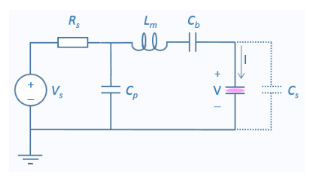
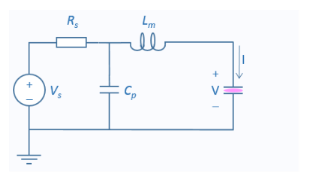
 and the generator source resistance, Rs, the following can be used to compute Cp and Lm. Defining:


 .
.
 .
.
|
1
|
In the Model Wizard window, The model is set up in an identical way to the computing plasma impedance model, except an external circuit is used to drive the discharge.
|
|
2
|
click
 1D. 1D. |
|
3
|
|
4
|
Click Add.
|
|
5
|
Click
 Study. Study. |
|
6
|
|
7
|
Click
 Done. Done. |
|
1
|
|
2
|
|
42.696 Ω
|
|||
|
-156.62 Ω
|
|||
|
50 Ω
|
|||
|
174.28 Ω
|
|||
|
1
|
|
2
|
|
4
|
|
5
|
|
1
|
|
2
|
|
3
|
|
4
|
|
5
|
|
6
|
Locate the Plasma Properties section. Select the Use reduced electron transport properties check box.
|
|
1
|
|
2
|
|
3
|
Click
 Browse. Browse. |
|
1
|
|
2
|
|
3
|
|
4
|
|
1
|
|
2
|
|
3
|
|
1
|
|
2
|
|
3
|
|
4
|
|
5
|
Click to collapse the Species Formula section. Click to expand the Mobility and Diffusivity Expressions section. From the Specification list, choose Specify mobility, compute diffusivity.
|
|
6
|
|
7
|
Click to expand the Mobility Specification section. From the Specify using list, choose Helium ion in helium.
|
|
1
|
|
2
|
|
3
|
|
4
|
|
1
|
|
2
|
|
3
|
|
4
|
|
5
|
|
6
|
|
7
|
|
1
|
|
2
|
|
3
|
|
4
|
|
1
|
|
2
|
|
3
|
|
1
|
|
1
|
|
3
|
|
4
|
|
5
|
|
6
|
|
7
|
|
8
|
|
9
|
|
10
|
|
11
|
|
1
|
|
2
|
|
3
|
|
4
|
|
5
|
|
6
|
|
7
|
|
1
|
|
2
|
|
3
|
|
4
|
|
1
|
|
2
|
|
3
|
|
4
|
Click
 Add. Add. |
|
7
|
Click
 Range. Range. |
|
8
|
|
9
|
|
10
|
|
11
|
|
12
|
Click Replace.
|
|
13
|
|
15
|
|
1
|
|
2
|
|
1
|
|
2
|
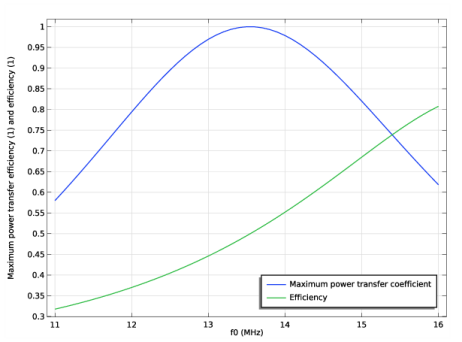
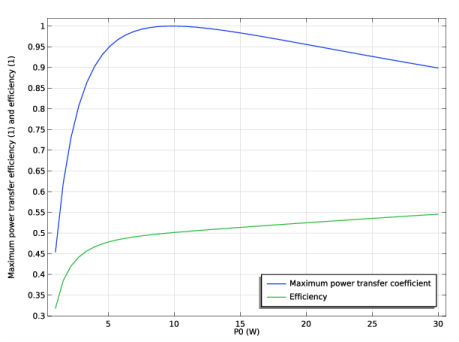
In the Settings window for Global, click Replace Expression in the upper-right corner of the y-Axis Data section. From the menu, choose Component 1 (comp1)>Plasma, Time Periodic>Metal Contact 1>Circuit variables>ptp.mct1.alphaP - Maximum power transfer coefficient.
|
|
3
|
Click Add Expression in the upper-right corner of the y-Axis Data section. From the menu, choose Component 1 (comp1)>Plasma, Time Periodic>Metal Contact 1>Circuit variables>ptp.mct1.etaP - Efficiency.
|
|
4
|
|
1
|
|
2
|
|
3
|
|
4
|
In the associated text field, type Maximum power transfer efficiency (1) and efficiency (1).
|
|
5
|
|
6
|
|
7
|
|
8
|
|
1
|
|
2
|
|
3
|
Find the Studies subsection. In the Select Study tree, select Preset Studies for Selected Physics Interfaces>Time Periodic.
|
|
4
|
|
5
|
|
1
|
|
2
|
|
3
|
Click
 Add. Add. |
|
6
|
Click
 Range. Range. |
|
7
|
|
8
|
|
9
|
|
10
|
|
11
|
Click Replace.
|
|
12
|
|
14
|
|
15
|
|
16
|
|
17
|
|
18
|
|
19
|
|
1
|
|
2
|
|
3
|
|
1
|
|
2
|
|
1
|
|
2
|
Find the Studies subsection. In the Select Study tree, select Preset Studies for Selected Physics Interfaces>Time Periodic.
|
|
3
|
|
4
|
|
1
|
|
2
|
|
3
|
Click
 Add. Add. |
|
6
|
Click
 Range. Range. |
|
7
|
|
8
|
|
9
|
|
10
|
|
11
|
Click Replace.
|
|
12
|
|
14
|
|
15
|
|
16
|
|
17
|
|
18
|
|
1
|
|
2
|
|
3
|
|
1
|
|
2
|
|
3
|
|
4
|
|
1
|
|
2
|
|
29.175 Ω
|
|||
|
-126.47 Ω
|
|
1
|
|
2
|
|
3
|
Find the Studies subsection. In the Select Study tree, select Preset Studies for Selected Physics Interfaces>Time Periodic.
|
|
4
|
|
5
|
|
1
|
|
2
|
|
3
|
Click
 Add. Add. |
|
6
|
Click
 Range. Range. |
|
7
|
|
8
|
|
9
|
|
10
|
|
11
|
Click Replace.
|
|
12
|
|
14
|
|
15
|
|
16
|
|
17
|
|
18
|
|
19
|
|
1
|
|
2
|
|
3
|
|
1
|
|
2
|
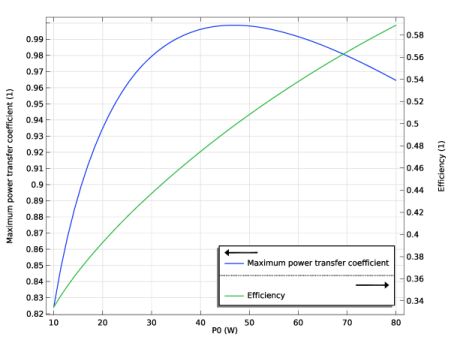
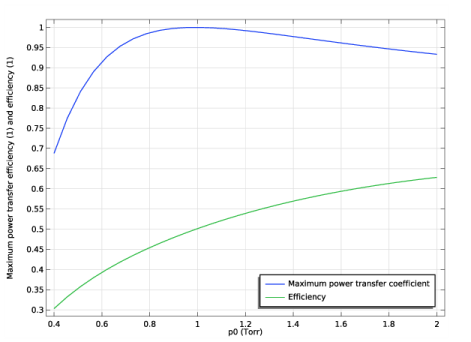
In the Settings window for Global, click Replace Expression in the upper-right corner of the y-Axis Data section. From the menu, choose Component 1 (comp1)>Plasma, Time Periodic>Metal Contact 1>Circuit variables>ptp.mct1.alphaP - Maximum power transfer coefficient.
|
|
3
|
|
1
|
|
2
|
In the Settings window for Global, click Replace Expression in the upper-right corner of the y-Axis Data section. From the menu, choose Component 1 (comp1)>Plasma, Time Periodic>Metal Contact 1>Circuit variables>ptp.mct1.etaP - Efficiency.
|
|
1
|
|
2
|
|
3
|
|
4
|
|
5
|
|
6
|
|
7
|
|
8
|
 at 13.56 MHz and 10 W. A matching network is introduced between the RF power supply and the CCP allowing maximum power transfer and a safe operating region for the power supply. In operation the match components may be fixed or variable and “tuned” either manually or automatically. Modern plasma reactors may be powered by multiple power supplies at different operating frequencies. This note shows how a match can be designed using dimensions of the chamber, properties of the feed gas and the specification of the power supply.