

You are viewing the documentation for an older COMSOL version. The latest version is available here.
PDF

Primary Creep Under Nonconstant Load
Introduction
In this model example, you study the creep behavior of material under nonconstant loading. You model the primary creep using a Norton-Bailey law and study the difference between the time hardening and the strain hardening methods available in COMSOL Multiphysics.
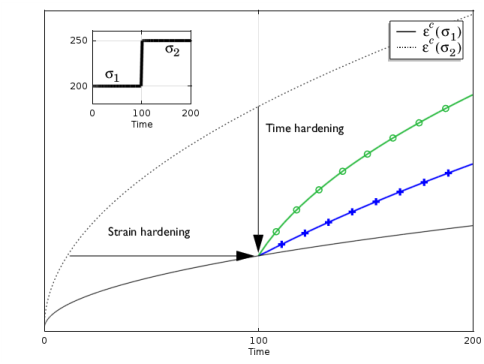
Time hardening assumes that the creep strain rate depends on the current stress and on the time passed from the start of the test. Strain hardening assumes that the creep strain rate depends on the current stress and the accumulated creep strain. Therefore, once the stress level changes, in time hardening the material follows the new behavior from the point where the times are equal, the strain-time relation shifts vertically. In strain hardening, the material follows the new behavior form the point where the strains are equal, the strain-time behavior shifts horizontally. This is illustrated in Figure 1 below.
Figure 1: Strain versus time curve for different primary creep formulations: time hardening in blue(+) and strain hardening in green (o). The load case is represented in the thumbnail in the upper-left corner.
The time hardening formulation is easier to use, while the strain hardening is usually considered to be more accurate.
The model is taken from NAFEMS Understanding Non-Linear Finite Analysis Through Illustrative Benchmarks (Ref. 1). The load consist of a uniaxial and a biaxial stepped load. The step in the load occurs at after a half of the full study time. The value of interest is the creep strain variation along the time. The computed solutions are compared with analytical solution given in the reference.
Additionally, a short discussion describes how to avoid nonphysical creep strains that can appear at the initial time step when a singular load condition is applied at early time.
Model Definition
The problem consists of a 100 mm length square plate under uniaxial and biaxial load cases. Different boundary constraints for each load case ensure uniaxial stress. After 100 hours, the applied load jump from 200 MPa to 250 MPa.
The thickness of the plate is assumed to be small enough to use the 2D plane stress assumption.
The Norton-Bailey that model the creep behavior is represented with the following creep strain definition:
The material constants are listed in the table below:
Both the time hardening and the strain hardening are used to represent the step load response versus time.
Results and Discussion
The problem has analytical results for both uniaxial and biaxial load cases, and for both the time and strain hardening formulations.
For the uniaxial load case, the target solution for the x-component of the creep strain is represented by the following expression:
The target solution for the biaxial load case is represented by the following expression:
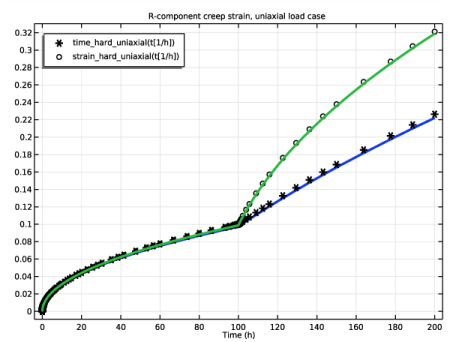
In Figure 2, you can see the results of the computed x-component of the creep strain for the uniaxial load case together with the target data (represented with markers).
Figure 2: The creep strain for time hardening (blue line) and strain hardening (green line) for the uniaxial load case. The reference data is represented by markers.
In the Figure 3, you can see the results of the computed x-component of the creep strain for the biaxial load case together with the target data (represented with markers).
Figure 3: The creep strain for time hardening (blue line) and strain hardening (green line) for the biaxial load case. The reference data is represented by markers.
The computed solutions agree very well with the analytical target for both the uniaxial and the biaxial load cases.
Notes About the COMSOL Implementation
A constant load at the initial time introduces a stress singularity. This can be a source of errors when the strain is defined via a strain rate formulation. At an infinitesimal time step, a nonphysical strain rate can be generated. You can avoid such a singularity by defining the load case using a smooth increase in time. Another solution is to enforce the initial computational time step to be large enough so that the creep strain is reduced. In COMSOL Multiphysics, the time hardening implementation makes it possible to define a time offset. Adjusting the time offset with the initial computational time step ensures to reduce the initial creep strain error. The time should be small compared to the computational study time. In the current example, a time of 1 second as been found sufficient.
For the strain hardening implementation, an initial strain value is requested to avoid an error related to computation a non-integer power of a negative number. Here, a value of 1×10⁻⁵ is found to be sufficient.
Reference
1. A.A. Becker, Understanding Non-Linear Finite Element Analysis Through Illustrative Benchmarks, NAFEMS R0080, 2001.
Application Library path: Nonlinear_Structural_Materials_Module/Creep/variable_load_creep
Modeling Instructions
From the File menu, choose New.
New
In the New window, click  Model Wizard.
Model Wizard
1
In the Model Wizard window, click  2D.
2
In the Select Physics tree, select Structural Mechanics>Solid Mechanics (solid).
3
Click Add.
4
Click  Study.
5
In the Select Study tree, select General Studies>Time Dependent.
6
Root
1
In the Model Builder window, click the root node.
2
In the root node’s Settings window, locate the Unit System section.
3
From the Unit system list, choose MPa.
Global Definitions
Parameters 1
1
In the Model Builder window, under Global Definitions click Parameters 1.
2
In the Settings window for Parameters, locate the Parameters section.
3
Definitions
Step 1 (step1)
1
In the Home toolbar, click  Functions and choose Local>Step.
2
In the Settings window for Step, type load in the Function name text field.
3
Locate the Parameters section. In the Location text field, type 100.
4
In the From text field, type 200.
5
In the To text field, type 250.
Global Definitions
Piecewise 1 (pw1)
1
In the Home toolbar, click  Functions and choose Global>Piecewise.
2
In the Settings window for Piecewise, type time_hard_uniaxial in the Function name text field.
3
Locate the Definition section. In the Argument text field, type t.
4
Find the Intervals subsection. In the table, enter the following settings:
Piecewise 2 (pw2)
1
In the Home toolbar, click  Functions and choose Global>Piecewise.
2
In the Settings window for Piecewise, type strain_hard_uniaxial in the Function name text field.
3
Locate the Definition section. In the Argument text field, type t.
4
Find the Intervals subsection. In the table, enter the following settings:
Piecewise 3 (pw3)
1
In the Home toolbar, click  Functions and choose Global>Piecewise.
2
In the Settings window for Piecewise, type time_hard_biaxial in the Function name text field.
3
Locate the Definition section. In the Argument text field, type t.
4
Find the Intervals subsection. In the table, enter the following settings:
Piecewise 4 (pw4)
1
In the Home toolbar, click  Functions and choose Global>Piecewise.
2
In the Settings window for Piecewise, type strain_hard_biaxial in the Function name text field.
3
Locate the Definition section. In the Argument text field, type t.
4
Find the Intervals subsection. In the table, enter the following settings:
Geometry 1
Square 1 (sq1)
1
In the Geometry toolbar, click  Square.
2
In the Settings window for Square, locate the Size section.
3
In the Side length text field, type 100[mm].
4
Click  Build Selected.
5
Click the  Zoom Extents button in the Graphics toolbar.
Solid Mechanics (solid)
1
In the Model Builder window, under Component 1 (comp1) click Solid Mechanics (solid).
2
In the Settings window for Solid Mechanics, locate the 2D Approximation section.
3
4
Locate the Structural Transient Behavior section. From the list, choose Quasistatic.
Linear Elastic Material 1
In the Model Builder window, under Component 1 (comp1)>Solid Mechanics (solid) click Linear Elastic Material 1.
Creep 1
1
In the Physics toolbar, click  Attributes and choose Creep.
2
In the Settings window for Creep, locate the Creep Model section.
3
Find the Isotropic hardening model subsection. From the h  (εce  ,t) list, choose Time hardening.
4
In the m text field, type m.
5
In the tshift text field, type t0.
Linear Elastic Material 1
In the Model Builder window, click Linear Elastic Material 1.
Creep 2
1
In the Physics toolbar, click  Attributes and choose Creep.
2
In the Settings window for Creep, locate the Creep Model section.
3
Find the Isotropic hardening model subsection. From the h  (εce  ,t) list, choose Strain hardening.
4
In the m text field, type m.
Roller 1
1
In the Physics toolbar, click  Boundaries and choose Roller.
2
Uniaxial Boundary Load
1
In the Physics toolbar, click  Boundaries and choose Boundary Load.
2
In the Settings window for Boundary Load, type Uniaxial Boundary Load in the Label text field.
3
Locate the Coordinate System Selection section. From the Coordinate system list, choose Boundary System 1 (sys1).
4
5
Locate the Force section. Specify the FA vector as
Biaxial Boundary Load
1
In the Physics toolbar, click  Boundaries and choose Boundary Load.
2
In the Settings window for Boundary Load, type Biaxial Boundary Load in the Label text field.
3
4
Locate the Coordinate System Selection section. From the Coordinate system list, choose Boundary System 1 (sys1).
5
Locate the Force section. Specify the FA vector as
Materials
Material 1 (mat1)
1
In the Model Builder window, under Component 1 (comp1) right-click Materials and choose Blank Material.
2
In the Settings window for Material, locate the Material Contents section.
3
Mesh 1
Mapped 1
In the Mesh toolbar, click  Mapped.
Distribution 1
1
Right-click Mapped 1 and choose Distribution.
2
3
In the Settings window for Distribution, locate the Distribution section.
4
In the Number of elements text field, type 2.
5
Click  Build All.
Time Hardening, Uniaxial
1
In the Model Builder window, click Study 1.
2
In the Settings window for Study, type Time Hardening, Uniaxial in the Label text field.
3
Locate the Study Settings section. Clear the Generate default plots check box.
Step 1: Time Dependent
Store output data at the time instances where target values are specified in the benchmark.
1
In the Model Builder window, under Time Hardening, Uniaxial click Step 1: Time Dependent.
2
In the Settings window for Time Dependent, locate the Study Settings section.
3
From the Time unit list, choose h.
4
In the Output times text field, type 0 20 60 100 150 200.
Disable unneeded features from the solver node.
1
Locate the Physics and Variables Selection section. Select the Modify model configuration for study step check box.
2
In the tree, select Component 1 (Comp1)>Solid Mechanics (Solid)>Linear Elastic Material 1>Creep 2.
3
Click  Disable.
4
In the tree, select Component 1 (Comp1)>Solid Mechanics (Solid)>Biaxial Boundary Load.
5
Click  Disable.
Solution 1 (sol1)
1
In the Study toolbar, click  Show Default Solver.
2
In the Model Builder window, expand the Solution 1 (sol1) node, then click Time-Dependent Solver 1.
3
In the Settings window for Time-Dependent Solver, click to expand the Absolute Tolerance section.
4
From the Tolerance method list, choose Manual.
5
In the Absolute tolerance text field, type 1e-4.
6
Click to expand the Time Stepping section. Select the Initial step check box.
7
From the Steps taken by solver list, choose Strict.
8
In the Initial step text field, type t0.
9
Click to expand the Output section. Locate the General section. From the Times to store list, choose Steps taken by solver.
10
In the Study toolbar, click  Compute.
11
In the Results toolbar, click  Cut Point 2D.
Results
Cut Point 2D 1
1
In the Settings window for Cut Point 2D, locate the Point Data section.
2
In the X text field, type 50[mm].
3
In the Y text field, type 50[mm].
Creep Strain, Uniaxial
1
In the Results toolbar, click  1D Plot Group.
2
In the Settings window for 1D Plot Group, type Creep Strain, Uniaxial in the Label text field.
3
Click to expand the Title section. From the Title type list, choose Manual.
4
In the Title text area, type R-component creep strain, uniaxial load case.
5
Locate the Legend section. From the Position list, choose Upper left.
Point Graph 1
1
Right-click Creep Strain, Uniaxial and choose Point Graph.
2
In the Settings window for Point Graph, locate the Data section.
3
From the Dataset list, choose Cut Point 2D 1.
4
Click Replace Expression in the upper-right corner of the y-Axis Data section. From the menu, choose Component 1 (comp1)>Solid Mechanics>Strain (Gauss points)>Creep strain tensor, local coordinate system>solid.eclGp11 - Creep strain tensor, local coordinate system, 11 component.
5
Click to expand the Coloring and Style section. In the Width text field, type 3.
Global 1
1
In the Model Builder window, right-click Creep Strain, Uniaxial and choose Global.
2
In the Settings window for Global, locate the y-Axis Data section.
3
4
Click to expand the Coloring and Style section. Find the Line style subsection. From the Line list, choose None.
5
From the Color list, choose From theme.
6
Find the Line markers subsection. From the Marker list, choose Cycle.
7
From the Positioning list, choose In data points.
8
Click to expand the Legends section. Find the Include subsection. Select the Expression check box.
9
In the Creep Strain, Uniaxial toolbar, click  Plot.
Add Study
1
In the Home toolbar, click  Add Study to open the Add Study window.
2
Go to the Add Study window.
3
Find the Studies subsection. In the Select Study tree, select General Studies>Time Dependent.
4
Click Add Study in the window toolbar.
5
In the Home toolbar, click  Add Study to close the Add Study window.
Strain Hardening, Uniaxial
1
In the Model Builder window, click Study 2.
2
In the Settings window for Study, type Strain Hardening, Uniaxial in the Label text field.
3
Locate the Study Settings section. Clear the Generate default plots check box.
Step 1: Time Dependent
1
In the Model Builder window, under Strain Hardening, Uniaxial click Step 1: Time Dependent.
2
In the Settings window for Time Dependent, locate the Study Settings section.
3
From the Time unit list, choose h.
4
In the Output times text field, type 0 20 60 100 150 200.
5
Locate the Physics and Variables Selection section. Select the Modify model configuration for study step check box.
6
In the tree, select Component 1 (Comp1)>Solid Mechanics (Solid)>Biaxial Boundary Load.
7
Click  Disable.
Solution 2 (sol2)
1
In the Study toolbar, click  Show Default Solver.
2
In the Model Builder window, expand the Solution 2 (sol2) node, then click Time-Dependent Solver 1.
3
In the Settings window for Time-Dependent Solver, locate the Absolute Tolerance section.
4
From the Tolerance method list, choose Manual.
5
In the Absolute tolerance text field, type 1e-4.
6
Locate the Time Stepping section. From the Steps taken by solver list, choose Strict.
7
Locate the General section. From the Times to store list, choose Steps taken by solver.
8
In the Study toolbar, click  Compute.
Results
Cut Point 2D 2
1
In the Model Builder window, under Results>Datasets right-click Cut Point 2D 1 and choose Duplicate.
2
In the Settings window for Cut Point 2D, locate the Data section.
3
From the Dataset list, choose Strain Hardening, Uniaxial/Solution 2 (sol2).
Point Graph 2
1
In the Model Builder window, under Results>Creep Strain, Uniaxial right-click Point Graph 1 and choose Duplicate.
2
In the Settings window for Point Graph, locate the Data section.
3
From the Dataset list, choose Cut Point 2D 2.
Global 1
1
In the Model Builder window, click Global 1.
2
In the Creep Strain, Uniaxial toolbar, click  Plot.
3
In the Settings window for Global, locate the y-Axis Data section.
4
5
In the Creep Strain, Uniaxial toolbar, click  Plot.
Add Study
1
In the Home toolbar, click  Add Study to open the Add Study window.
2
Go to the Add Study window.
3
Find the Studies subsection. In the Select Study tree, select General Studies>Time Dependent.
4
Click Add Study in the window toolbar.
5
In the Home toolbar, click  Add Study to close the Add Study window.
Time Hardening, Biaxial
1
In the Model Builder window, click Study 3.
2
In the Settings window for Study, type Time Hardening, Biaxial in the Label text field.
3
Locate the Study Settings section. Clear the Generate default plots check box.
Step 1: Time Dependent
1
In the Model Builder window, under Time Hardening, Biaxial click Step 1: Time Dependent.
2
In the Settings window for Time Dependent, locate the Study Settings section.
3
From the Time unit list, choose h.
4
In the Output times text field, type 0 20 60 100 150 200.
5
Locate the Physics and Variables Selection section. Select the Modify model configuration for study step check box.
6
In the tree, select Component 1 (Comp1)>Solid Mechanics (Solid)>Linear Elastic Material 1>Creep 2.
7
Click  Disable.
8
In the tree, select Component 1 (Comp1)>Solid Mechanics (Solid)>Uniaxial Boundary Load.
9
Click  Disable.
Solution 3 (sol3)
1
In the Study toolbar, click  Show Default Solver.
2
In the Model Builder window, expand the Solution 3 (sol3) node, then click Time-Dependent Solver 1.
3
In the Settings window for Time-Dependent Solver, locate the Absolute Tolerance section.
4
From the Tolerance method list, choose Manual.
5
In the Absolute tolerance text field, type 1e-4.
6
Locate the Time Stepping section. From the Steps taken by solver list, choose Strict.
7
Select the Initial step check box.
8
9
Locate the General section. From the Times to store list, choose Steps taken by solver.
10
In the Study toolbar, click  Compute.
Results
Cut Point 2D 3
1
In the Model Builder window, under Results>Datasets right-click Cut Point 2D 2 and choose Duplicate.
2
In the Settings window for Cut Point 2D, locate the Data section.
3
From the Dataset list, choose Time Hardening, Biaxial/Solution 3 (sol3).
Creep Strain, Biaxial
1
In the Home toolbar, click  Add Plot Group and choose 1D Plot Group.
2
In the Settings window for 1D Plot Group, type Creep Strain, Biaxial in the Label text field.
3
Locate the Title section. From the Title type list, choose Manual.
4
In the Title text area, type R-component creep strain, biaxial load case.
5
Locate the Legend section. From the Position list, choose Upper left.
Point Graph 1
1
Right-click Creep Strain, Biaxial and choose Point Graph.
2
In the Settings window for Point Graph, locate the Data section.
3
From the Dataset list, choose Cut Point 2D 3.
4
Click Replace Expression in the upper-right corner of the y-Axis Data section. From the menu, choose Component 1 (comp1)>Solid Mechanics>Strain (Gauss points)>Creep strain tensor, local coordinate system>solid.eclGp11 - Creep strain tensor, local coordinate system, 11 component.
5
Locate the Coloring and Style section. In the Width text field, type 3.
Global 1
1
In the Model Builder window, right-click Creep Strain, Biaxial and choose Global.
2
In the Settings window for Global, locate the y-Axis Data section.
3
4
Locate the Coloring and Style section. Find the Line style subsection. From the Line list, choose None.
5
From the Color list, choose From theme.
6
Find the Line markers subsection. From the Marker list, choose Cycle.
7
From the Positioning list, choose In data points.
8
Locate the Legends section. Find the Include subsection. Select the Expression check box.
9
In the Creep Strain, Biaxial toolbar, click  Plot.
Add Study
1
In the Home toolbar, click  Add Study to open the Add Study window.
2
Go to the Add Study window.
3
Find the Studies subsection. In the Select Study tree, select General Studies>Time Dependent.
4
Click Add Study in the window toolbar.
5
In the Home toolbar, click  Add Study to close the Add Study window.
Strain Hardening, Biaxial
1
In the Model Builder window, click Study 4.
2
In the Settings window for Study, type Strain Hardening, Biaxial in the Label text field.
3
Locate the Study Settings section. Clear the Generate default plots check box.
Step 1: Time Dependent
1
In the Model Builder window, under Strain Hardening, Biaxial click Step 1: Time Dependent.
2
In the Settings window for Time Dependent, locate the Study Settings section.
3
From the Time unit list, choose h.
4
In the Output times text field, type 0 20 60 100 150 200.
5
Locate the Physics and Variables Selection section. Select the Modify model configuration for study step check box.
6
In the tree, select Component 1 (Comp1)>Solid Mechanics (Solid)>Uniaxial Boundary Load.
7
Click  Disable.
Solution 4 (sol4)
1
In the Study toolbar, click  Show Default Solver.
2
In the Model Builder window, expand the Solution 4 (sol4) node, then click Time-Dependent Solver 1.
3
In the Settings window for Time-Dependent Solver, locate the Absolute Tolerance section.
4
From the Tolerance method list, choose Manual.
5
In the Absolute tolerance text field, type 1e-4.
6
Locate the Time Stepping section. From the Steps taken by solver list, choose Strict.
7
Locate the General section. From the Times to store list, choose Steps taken by solver.
8
In the Study toolbar, click  Compute.
Results
Cut Point 2D 4
1
In the Model Builder window, under Results>Datasets right-click Cut Point 2D 3 and choose Duplicate.
2
In the Settings window for Cut Point 2D, locate the Data section.
3
From the Dataset list, choose Strain Hardening, Biaxial/Solution 4 (sol4).
Point Graph 2
1
In the Model Builder window, under Results>Creep Strain, Biaxial right-click Point Graph 1 and choose Duplicate.
2
In the Settings window for Point Graph, locate the Data section.
3
From the Dataset list, choose Cut Point 2D 4.
Global 1
1
In the Model Builder window, click Global 1.
2
In the Creep Strain, Biaxial toolbar, click  Plot.
3
In the Settings window for Global, locate the y-Axis Data section.
4
5
In the Creep Strain, Biaxial toolbar, click  Plot.