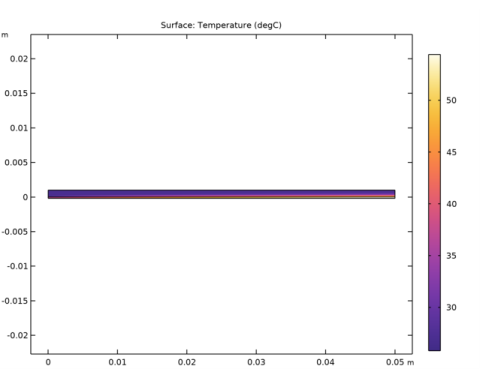
|
|
|
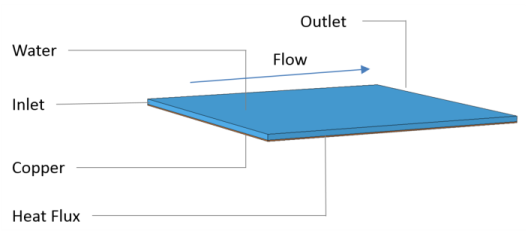

|
•
|
X and Y are the space coordinates on the material frame
|
|
•
|
t is the time variable
|
|
•
|
A is the ratio of oscillation amplitude to channel height
|
|
•
|
|
•
|
ft(t) is the normalized amplitude of the oscillations as a function of time and included a smooth starting effect
|
|
•
|
N is the number of waves in the channel length direction
|
|
•
|
L is the channel length
|
|
•
|
f is the oscillation frequency
|


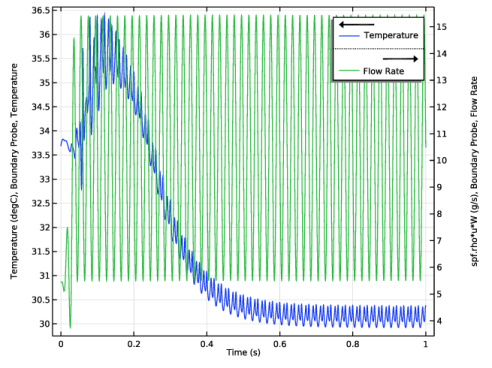
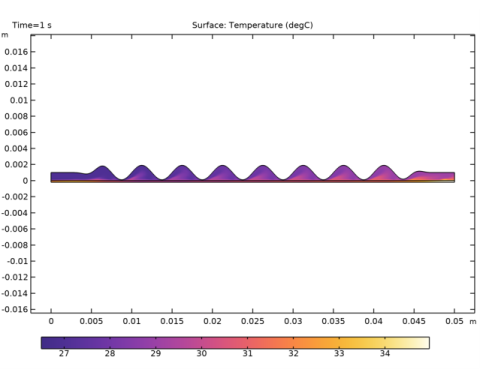

|
1
|
|
2
|
|
3
|
Click Add.
|
|
4
|
Click
 Study. Study. |
|
5
|
|
6
|
Click
 Done. Done. |
|
1
|
|
2
|
|
3
|
|
4
|
Browse to the model’s Application Libraries folder and double-click the file dynamic_wall_heat_exchanger_parameters.txt.
|
|
1
|
|
2
|
|
3
|
|
4
|
|
1
|
|
2
|
|
3
|
|
4
|
|
5
|
|
1
|
|
3
|
|
4
|
|
6
|
|
8
|
|
10
|
Locate the Destination Vertices section. Click to select the
 Activate Selection toggle button for Destination vertex 1. Activate Selection toggle button for Destination vertex 1. |
|
12
|
|
1
|
|
2
|
|
3
|
|
1
|
|
2
|
|
3
|
|
4
|
Browse to the model’s Application Libraries folder and double-click the file dynamic_wall_heat_exchanger_variables.txt.
|
|
1
|
|
2
|
|
3
|
|
4
|
|
5
|
In the tree, select Built-in>Copper.
|
|
6
|
|
7
|
|
1
|
|
2
|
|
3
|
|
1
|
In the Model Builder window, under Component 1 (comp1) click Heat Transfer in Solids and Fluids (ht).
|
|
2
|
|
3
|
|
4
|
|
1
|
In the Model Builder window, under Component 1 (comp1)>Heat Transfer in Solids and Fluids (ht) click Fluid 1.
|
|
1
|
|
2
|
|
3
|
|
1
|
|
3
|
|
4
|
|
5
|
|
6
|
|
7
|
Click OK.
|
|
1
|
|
3
|
|
4
|
|
5
|
|
6
|
Click OK.
|
|
1
|
|
3
|
|
4
|
|
5
|
|
1
|
|
3
|
|
4
|
|
1
|
|
2
|
|
3
|
|
4
|
|
5
|
|
1
|
|
2
|
|
3
|
|
1
|
|
2
|
|
3
|
|
4
|
|
5
|
|
1
|
|
2
|
|
3
|
|
1
|
|
2
|
In the Settings window for Line Integration, type Mass Flow Rate, Static Case in the Label text field.
|
|
3
|
|
4
|
Locate the Expressions section. In the table, enter the following settings:
|
|
5
|
Click
 Evaluate. Evaluate. |
|
1
|
|
2
|
In the Settings window for Global Evaluation, type Heat Transfer Coefficient, Static Case in the Label text field.
|
|
3
|
Click Replace Expression in the upper-right corner of the Expressions section. From the menu, choose Component 1 (comp1)>Definitions>Variables>htc - Global heat transfer coefficient - W/(m²·K).
|
|
4
|
Click
 Evaluate. Evaluate. |
|
1
|
|
2
|
In the Settings window for Boundary Probe, type Boundary Probe, Temperature in the Label text field.
|
|
3
|
|
4
|
|
1
|
|
2
|
|
3
|
|
4
|
|
5
|
|
6
|
|
2
|
|
3
|
Specify the dx vector as
|
|
1
|
|
2
|
|
3
|
|
4
|
|
5
|
|
6
|
|
7
|
|
1
|
|
2
|
|
3
|
|
4
|
|
5
|
|
1
|
|
2
|
|
3
|
Click to expand the Values of Dependent Variables section. Find the Initial values of variables solved for subsection. From the Settings list, choose User controlled.
|
|
4
|
|
5
|
|
1
|
|
2
|
|
3
|
|
4
|
|
5
|
|
6
|
|
1
|
|
2
|
|
3
|
|
1
|
|
2
|
|
3
|
|
4
|
|
1
|
|
2
|
|
1
|
In the Model Builder window, expand the Temperature and Flow Rate node, then click Probe Table Graph 1.
|
|
2
|
|
3
|
|
4
|
|
7
|
Click
 Delete. Delete. |
|
1
|
|
2
|
|
3
|
|
4
|
|
5
|
|
6
|
|
7
|
|
1
|
|
2
|
|
3
|
|
4
|
|
5
|
|
1
|
|
2
|
In the Settings window for Line Integration, type Mass Flow Rate, Dynamic Case in the Label text field.
|
|
3
|
|
4
|
|
5
|
|
6
|
|
7
|
Click
 Evaluate. Evaluate. |
|
1
|
In the Model Builder window, right-click Heat Transfer Coefficient, Static Case and choose Duplicate.
|
|
2
|
In the Settings window for Global Evaluation, type Heat Transfer Coefficient, Dynamic Case in the Label text field.
|
|
3
|
|
4
|
|
5
|
|
6
|
|
7
|
Click
 Evaluate. Evaluate. |
|
1
|
|
2
|
|
3
|
|
4
|
|
1
|
|
2
|
|
3
|
|
1
|
|
2
|
|
3
|
|
4
|
|
1
|
|
2
|
|
3
|
|
4
|
|
1
|
|
2
|
|
3
|
|
4
|
|
5
|
|
6
|
|
1
|
|
1
|
|
2
|
|
3
|
|
4
|