|
|
|
|
1
|
|
2
|
|
3
|
Click Add.
|
|
4
|
Click
 Study. Study. |
|
5
|
|
6
|
Click
 Done. Done. |
|
1
|
|
2
|
Browse to the model’s Application Libraries folder and double-click the file static_field_halbach_rotor_3d_geom_sequence.mph.
|
|
3
|
|
4
|
|
5
|
|
1
|
|
3
|
|
4
|
|
5
|
Click OK.
|
|
1
|
|
2
|
|
3
|
In the Show More Options dialog box, in the tree, select the check box for the node General>Variable Utilities.
|
|
4
|
Click OK.
|
|
1
|
|
2
|
|
4
|
|
5
|
Click Replace Expression in the upper-right corner of the Input section. From the menu, choose Component 1 (comp1)>Magnetic Fields>Magnetic>Magnetic flux density>mf.B_s - Magnetic flux density - T.
|
|
6
|
|
7
|
|
1
|
|
2
|
|
3
|
|
1
|
In the Model Builder window, under Component 1 (comp1) right-click Magnetic Fields (mf) and choose Ampère’s Law.
|
|
3
|
|
4
|
|
5
|
Locate the Constitutive Relation B-H section. From the Magnetization model list, choose Remanent flux density.
|
|
6
|
|
1
|
|
3
|
|
4
|
|
5
|
Locate the Constitutive Relation B-H section. From the Magnetization model list, choose Remanent flux density.
|
|
6
|
Specify the e vector as
|
|
7
|
|
1
|
|
3
|
|
4
|
|
5
|
Locate the Constitutive Relation B-H section. From the Magnetization model list, choose Remanent flux density.
|
|
6
|
Specify the e vector as
|
|
7
|
|
1
|
|
2
|
|
3
|
In the tree, select Built-in>Air.
|
|
4
|
|
5
|
In the tree, select AC/DC>Hard Magnetic Materials>Sintered NdFeB Grades (Chinese Standard)>N50 (Sintered NdFeB).
|
|
6
|
|
7
|
|
1
|
|
2
|
|
1
|
|
2
|
|
3
|
|
1
|
|
2
|
|
3
|
|
4
|
|
5
|
|
1
|
|
2
|
|
3
|
|
5
|
|
6
|
|
1
|
|
2
|
|
1
|
|
2
|
|
3
|
|
4
|
|
1
|
|
2
|
|
3
|
|
4
|
|
5
|
|
6
|
|
1
|
|
2
|
|
3
|
|
4
|
|
5
|
|
6
|
|
7
|
|
1
|
|
2
|
|
3
|
|
4
|
|
5
|
|
6
|
|
7
|
|
1
|
|
2
|
|
3
|
|
1
|
|
2
|
|
3
|
|
4
|
|
5
|
|
1
|
|
2
|
|
3
|
|
4
|
|
5
|
|
6
|
|
7
|
|
8
|
|
1
|
|
2
|
|
3
|
|
4
|
|
5
|
In the associated text field, type Angle (rad).
|
|
1
|
|
2
|
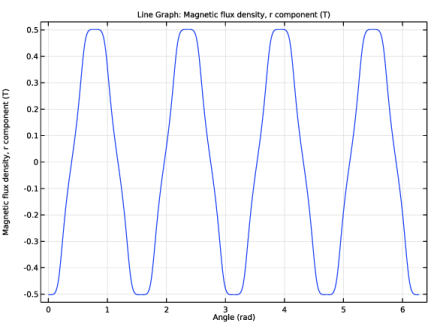
In the Settings window for Line Graph, click Replace Expression in the upper-right corner of the y-Axis Data section. From the menu, choose Component 1 (comp1)>Definitions>Vector Transform 1 (B_cyl)>Transformed vector - T>B_cyl.vr - Transformed vector, r component.
|
|
3
|
|
4
|
|
5
|
|
6
|
In the associated text field, type Magnetic flux density, r component.
|
|
7
|
|
1
|
|
2
|
|
3
|
|
4
|
|
5
|
In the associated text field, type Angle (rad).
|
|
1
|
|
2
|
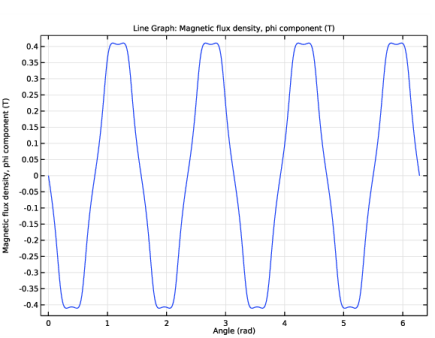
In the Settings window for Line Graph, click Replace Expression in the upper-right corner of the y-Axis Data section. From the menu, choose Component 1 (comp1)>Definitions>Vector Transform 1 (B_cyl)>Transformed vector - T>B_cyl.vphi - Transformed vector, phi component.
|
|
3
|
Locate the y-Axis Data section. In the Expression text field, type B_cyl.vphi*(1-2*mod(sec1number,2)).
|
|
4
|
Select the Description check box.
|
|
5
|
In the associated text field, type Magnetic flux density, phi component.
|
|
6
|
|
7
|
|
8
|
|
1
|
|
2
|
|
3
|
|
4
|
|
5
|
|
1
|
|
2
|
|
3
|
|
4
|
|
5
|
|
1
|
|
2
|
|
3
|
|
4
|
|
5
|
|
1
|
|
2
|
|
3
|
|
4
|
|
5
|