 Chemical Species Transport Chemical Species Transport |
|||||
 |
|||||
 Reacting Flow Reacting Flow |
|||||
 |
|||||
 Fluid Flow Fluid Flow |
|||||
 Single-Phase Flow Single-Phase Flow |
|||||
 |
|||||
 |
|||||
 |
|||||
 Rotating Machinery, Fluid Flow Rotating Machinery, Fluid Flow |
|||||
 |
|||||
 Multiphase Flow Multiphase Flow |
|||||
 Two-Phase Flow, Moving Mesh Two-Phase Flow, Moving Mesh |
|||||
 |
|||||
 Two-Phase Flow, Level Set Two-Phase Flow, Level Set |
|||||
 |
|||||
 Two-Phase Flow, Phase Field Two-Phase Flow, Phase Field |
|||||
 |
|||||
 Three-Phase Flow, Phase Field Three-Phase Flow, Phase Field |
|||||
 |
|||||
 Nonisothermal Flow Nonisothermal Flow |
|||||
|
Laminar Flow(2)
|
 |
||||
 Heat Transfer Heat Transfer |
|||||
 |
|||||
 |
|||||
 Moving Interface Moving Interface |
|||||
 |
|||||
 |
|||||
 |
|||||
|
1 This physics interface is included with the core COMSOL package but has added functionality for this module.
|
|||||
|
2 This physics interface is a predefined multiphysics coupling that automatically adds all the physics interfaces and coupling features required.
|
|||||
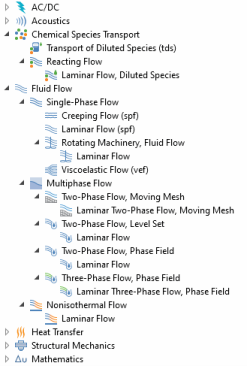
 ) approximates the Navier-Stokes equations for very low Reynolds numbers. This is often referred to as Stokes flow and is applicable when viscous effects are dominant, such as in very small channels or microfluidics devices.
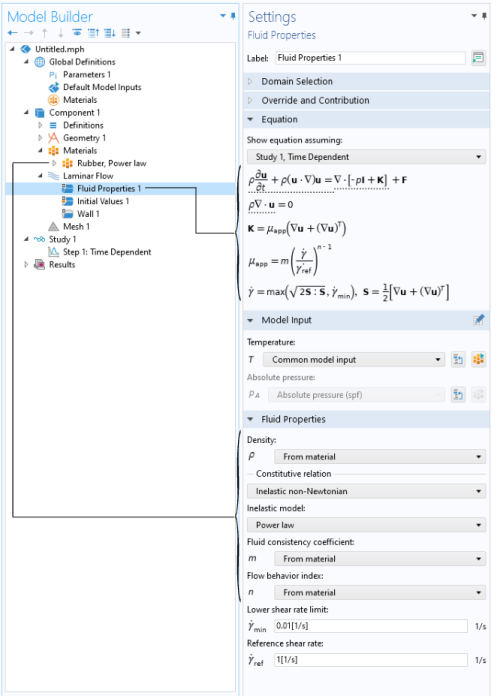
 ) is primarily applied to flows at low to intermediate Reynolds numbers. This physics interface solves the Navier-Stokes equations for incompressible, weakly compressible, and compressible flows (up to Mach 0.3). The Laminar Flow interface also allows for simulation of non-Newtonian fluids.
 ) combines the Laminar Flow interface and a Rotating Domain, and is applicable to fluid-flow problems where one or more of the boundaries rotate, for example in mixers and around propellers. The physics interface supports incompressible, weakly compressible and compressible (Mach < 0.3) laminar flows of Newtonian and non-Newtonian fluids.
 ) is used to simulate incompressible isothermal flow of viscoelastic fluids. It solves the continuity equation, the momentum equation and a constitutive equation that defines the elastic stresses. There are four predefined models for the elastic stresses: Oldroyd-B, FENE-P, Giesekus and LPTT.
 ), the Two-Phase Flow, Phase Field interface (
 ), and the Two Phase Flow, Moving Mesh interface (
 ) are used to model two fluids separated by a fluid-fluid interface. The moving interface is tracked in detail using either the level set method, the phase field method, or by a moving mesh, respectively. The level set and phase field methods use a fixed mesh and solve additional equations to track the interface location. The moving mesh method solves the Navier Stokes equations on a moving mesh with boundary conditions to represent the interface. In this case equations must be solved for the mesh deformation. Since a surface in the geometry is used to represent the interface between the two fluids in the Moving Mesh interface, the interface itself cannot break up into multiple disconnected surfaces. This means that the Moving Mesh interface cannot be applied to problems such as droplet formation in inkjet devices (in these applications the level set or phase field interfaces are appropriate). These physics interfaces support incompressible flows, where one or both fluids can be non-Newtonian.
 ) models laminar flow of three incompressible phases which may be either Newtonian or non-Newtonian. The moving fluid-fluid interfaces between the three phases are tracked in detail using the phase-field method.
 ) is primarily applied to model flow at low to intermediate Reynolds numbers in situations where the temperature and flow fields have to be coupled. A typical example is natural convection, where thermal buoyancy forces drive the flow. This is a multiphysics interface for which the nonlocal couplings between fluid flow and heat transfer are set up automatically.
 ) under the Reacting Flow branch combines the functionality of the Single-Phase Flow and Transport of Diluted Species interfaces. The physics interface is primarily applied to model flow at low to intermediate Reynolds numbers in situations where the mass transport and flow fields have to be coupled.