You are viewing the documentation for an older COMSOL version. The latest version is available here.
PDF

Bracket — Spring Foundation Analysis
Introduction
A fixed, fully constrained, boundary condition contains the assumption that the analyzed structure is attached to an infinitely stiff support. While in many cases this is a useful approximation, sometimes you may need to consider the stiffness of the supporting structure in your model. In COMSOL Multiphysics you can do this by using the Spring Foundation boundary condition.
In this example, you study the stress in a bracket subjected to external loads. The stiffness of the mounted bolts connecting support is modeled with spring foundations.
It is recommended you review the Introduction to the Structural Mechanics Module, which includes background information and discusses the bracket_basic.mph model relevant to this example.
Model Definition
This model is an extension of the model example described in the section “The Fundamentals: A Static Linear Analysis” in the Introduction to the Structural Mechanics Module.
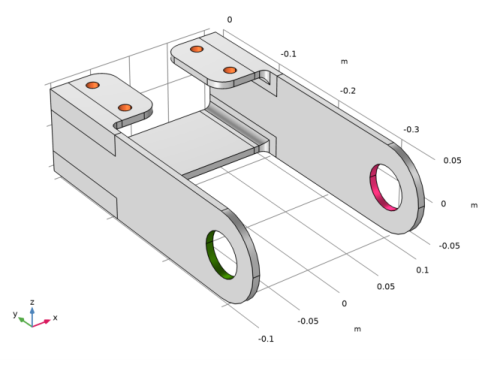
The model geometry is represented in Figure 1.
Figure 1: Bracket geometry.
The load is applied in the positive z-direction in the bracket left arm and in the negative z-direction in the bracket right arm, the same as in the original model.
The bolts are assumed to be elastic, defined with spring foundations.
Results and Discussion
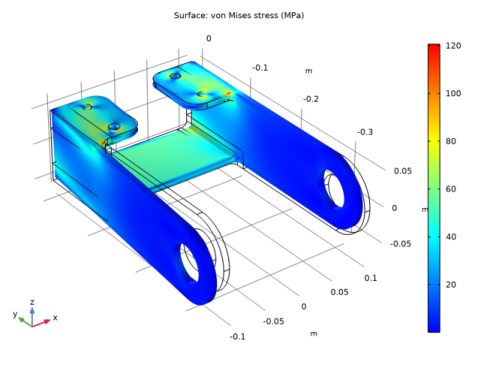
Figure 2 shows the von Mises stress on a deformed geometry.
Figure 2: The Von Mises stress distribution.
The maximum stress in the bracket when connected using spring foundation is about 120 MPa. This is significantly lower than when using rigidly mounted bolts (see the Results section in the tutorial Bracket - Static analysis). There the maximum stress is about 190 MPa. The difference in the stress is caused by the flexibility that a spring connection provides.
Application Library path: Structural_Mechanics_Module/Tutorials/bracket_spring
Modeling Instructions
From the File menu, choose Open.
Browse to the model’s Application Libraries folder and double-click the file bracket_basic.mph.
Component 1 (comp1)
Add the two new parameters for the spring coefficients of the external structure to the table.
Global Definitions
Parameters 1
1
In the Model Builder window, under Global Definitions click Parameters 1.
2
In the Settings window for Parameters, locate the Parameters section.
3
Definitions
Analytic 1 (an1)
1
In the Home toolbar, click  Functions and choose Local>Analytic.
2
In the Settings window for Analytic, type load in the Function name text field.
3
Locate the Definition section. In the Expression text field, type F*cos(atan2(py,abs(px))).
4
In the Arguments text field, type F, py, px.
5
Locate the Units section. In the Arguments text field, type Pa, m, m.
6
In the Function text field, type Pa.
Solid Mechanics (solid)
Boundary Load 1
1
In the Model Builder window, under Component 1 (comp1) right-click Solid Mechanics (solid) and choose Boundary Load.
Apply a boundary load to the bracket holes.
2
In the Settings window for Boundary Load, locate the Boundary Selection section.
3
From the Selection list, choose Pin Holes.
4
Locate the Coordinate System Selection section. From the Coordinate system list, choose Boundary System 1 (sys1).
5
Locate the Force section. Specify the FA vector as
Fixed Constraint 1
In the Model Builder window, right-click Fixed Constraint 1 and choose Disable.
Spring Foundation 1
1
In the Physics toolbar, click  Boundaries and choose Spring Foundation.
2
In the Settings window for Spring Foundation, locate the Boundary Selection section.
3
From the Selection list, choose Bolt Holes.
4
Locate the Spring section. From the Spring type list, choose Total spring constant.
5
6
In the ktot table, enter the following settings:
Add Study
1
In the Home toolbar, click  Add Study to open the Add Study window.
2
Go to the Add Study window.
3
Find the Studies subsection. In the Select Study tree, select General Studies>Stationary.
4
Click Add Study in the window toolbar.
5
In the Home toolbar, click  Add Study to close the Add Study window.
Study 1
Step 1: Stationary
In the Home toolbar, click  Compute.
Results
Stress (solid)
The default plot shows the von Mises stress distribution, shown in Figure 2.
Surface 1
1
In the Model Builder window, expand the Stress (solid) node, then click Surface 1.
2
In the Settings window for Surface, locate the Expression section.
3
From the Unit list, choose MPa.
4
In the Stress (solid) toolbar, click  Plot.