

You are viewing the documentation for an older COMSOL version. The latest version is available here.
PDF

Discharging Tank
Introduction
This tutorial model illustrates how to calculate the pressure drop and initial flow rate in a pipe system connected to water tank. The Pipe Flow interface contains ready-to-use friction models accounting for the surface roughness of pipes as well as energy losses in bends and valves.
Model Definition
Water from a tank flows through a total of 105 m of pipe to be discharged through an open ball valve. The pipes are 15 cm in diameter and made out of galvanized iron. The water level is 10 m above the point of discharge.
Figure 1: Water flows through a pipe system with two 90° bends and discharges through an open ball valve.
The model example is taken from Ref. 1.
The Momentum Equation
Inside a stretch of pipe section, the momentum balance solved is:
(1)
and the continuity equation
(2)
The term on the left-hand side of Equation 1 is the pressure gradient along the tangential direction (flow direction) of a pipe stretch. The first term on the right-hand side represents the pressure drop due to viscous shear. fD is the Darcy friction factor, dh is the hydraulic diameter and u is the velocity mean value across a pipe cross section. F is a volume force term (SI unit: N/m3), in this case used to account for gravity. ρ and A in Equation 2 are fluid density (kg/m3) and cross section area (m3), respectively. To find out more about these equations and variables, please refer to the section Theory for the Pipe Flow Interface in the Pipe Flow Module User’s Guide.
Expressions for the Darcy Friction Factor
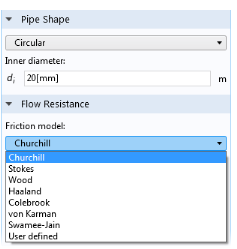
The Pipe Flow interface provides a library of built-in expressions for the Darcy friction factor, fD.
Figure 2: Select from different predefined Friction models in the Pipe Properties node.
This example uses the Churchill relation (Ref. 2) that is valid for laminar flow, turbulent flow, and the transitional region in between these regimes. The Churchill relation is:
where
As seen from the equations above, the friction factor is a function of the surface roughness divided by diameter of the pipe. Surface roughness data can be selected from a predefined list in the Pipe Properties feature.
The Churchill equation is also a function of the fluid properties and flow type, and geometry, through the Reynolds number:
The physical properties of water as function of temperature are directly available from the software’s built-in material library.
Additional Flow Resistances
In pipe networks, fittings, bends, valves, and so on, induce additional energy losses
characterized by loss coefficients, Ki. The Pipe Flow interface can include such resistances through the point features. This model uses two 90° bends and a Ball valve.
Boundary Conditions
At the pipe inlet from the tank, see Figure 1, the pressure is taken as the atmospheric pressure at the top water surface in the tank plus the hydrostatic pressure due to the water column:
where g is the normal gravitational acceleration (m/s2) and the h the elevation height (m), the latter which is 25 m in this case. At the system outlet to the right, atmospheric pressure p0 is specified.
Results and Discussion
Figure 3 shows the pressure drop over the pipe system, while Figure 4 shows the direction of flow and the fluid velocity.
Figure 3: Pressure drop across the pipe system.
Figure 4: The fluid velocity is constant at approximately 3.1 m/s.
The initial discharge rate is calculated to 54.5 m3/s. A check of the Reynolds number produces Re = 4.58·105 and indicates that the flow is well in the turbulent regime.
References
1. J.M. Coulson and J.F. Richardson, Chemical Engineering vol. 1, 4th ed., Pergamon Press, pp. 74–75, 1990.
2. S.W. Churchill, “Friction factor equation spans all fluid-flow regimes,” Chem. Eng., vol. 84, no. 24, p. 91, 1997.
Application Library path: Pipe_Flow_Module/Tutorials/discharging_tank
Modeling Instructions
From the File menu, choose New.
New
In the New window, click  Model Wizard.
Model Wizard
1
In the Model Wizard window, click  2D.
2
In the Select Physics tree, select Fluid Flow>Single-Phase Flow>Pipe Flow (pfl).
3
Click Add.
4
Click  Study.
5
In the Select Study tree, select General Studies>Stationary.
6
Geometry 1
Polygon 1 (pol1)
1
In the Geometry toolbar, click  Polygon.
2
In the Settings window for Polygon, locate the Object Type section.
3
From the Type list, choose Open curve.
4
Locate the Coordinates section. In the table, enter the following settings:
Materials
Now add Water from the Material Library. The material properties will apply to the entire model domain by default.
Add Material
1
In the Home toolbar, click  Add Material to open the Add Material window.
2
Go to the Add Material window.
3
In the tree, select Built-in>Water, liquid.
4
Click Add to Component in the window toolbar.
5
In the Home toolbar, click  Add Material to close the Add Material window.
Materials
Water, liquid (mat1)
Click the  Zoom Extents button in the Graphics toolbar.
Pipe Flow (pfl)
Next, specify the dimensions and surface roughness of the pipe. Note that you can add multiple Pipe Properties features and assign them to different parts of a pipe network, should you have a system of made up of pipes with different characteristics.
Pipe Properties 1
1
In the Model Builder window, under Component 1 (comp1)>Pipe Flow (pfl) click Pipe Properties 1.
2
In the Settings window for Pipe Properties, locate the Pipe Shape section.
3
4
In the di text field, type 15[cm].
5
Locate the Flow Resistance section. From the Surface roughness list, choose Galvanized iron (0.15 mm).
Pressure 2
1
In the Physics toolbar, click  Points and choose Pressure.
2
3
In the Settings window for Pressure, locate the Boundary Pressure section.
4
In the p0 text field, type 101325[Pa]+(25[m])*g_const*pfl.rho.
Volume Force 1
Set boundary conditions for the inlet and outlet and use a Volume Force feature to take gravity effects into account.
1
In the Physics toolbar, click  Boundaries and choose Volume Force.
2
The default volume force is a gravity vector pointing in the negative y direction (downward).
3
Click the  Zoom Extents button in the Graphics toolbar.
Next, add a number of point features to include the energy losses due to bends and the ball valve. The valve point may be difficult to select graphically with the mouse. Here, you can use the Selection list, as help to browse the points in a list.
Bend 1
1
In the Physics toolbar, click  Points and choose Bend.
2
Valve 1
1
In the Physics toolbar, click  Points and choose Valve.
2
3
In the Settings window for Valve, locate the Valve Specification section.
4
From the Valve list, choose Ball valve (K = 4.5).
To help graphically indicate locations of pipe network elements, the physics symbols are available.
5
In the Model Builder window, click Pipe Flow (pfl).
6
In the Settings window for Pipe Flow, locate the Physics Symbols section.
7
Select the Enable physics symbols check box.
8
Find the Show or hide all physics symbols subsection. Click Select All to display physics symbols for all features.
Study 1
The model is now ready for solving. Lower the default tolerance to increase the accuracy of the solution.
Solution 1 (sol1)
1
In the Study toolbar, click  Show Default Solver.
2
In the Model Builder window, expand the Solution 1 (sol1) node, then click Stationary Solver 1.
3
In the Settings window for Stationary Solver, locate the General section.
4
In the Relative tolerance text field, type 1e-6.
5
In the Study toolbar, click  Compute.
Results
Velocity (pfl)
Default plots show the pressure drop in the pipe system, and the direction and velocity of the flow (Figure 3 and Figure 4). Now select from predefined plot quantities to evaluate the volumetric flow rate and the Reynolds number.
1
In the Model Builder window, expand the Velocity (pfl) node.
Color Expression 1
1
In the Model Builder window, expand the Results>Velocity (pfl)>Arrow Line 1 node, then click Color Expression 1.
2
In the Settings window for Color Expression, click Replace Expression in the upper-right corner of the Expression section. From the menu, choose Component 1 (comp1)>Pipe Flow>pfl.Re - Reynolds number.
3
Click to expand the Title section. From the Title type list, choose Automatic.
4
In the Velocity (pfl) toolbar, click  Plot.