You are viewing the documentation for an older COMSOL version. The latest version is available here.
PDF

Aluminum Anodization
Introduction
When anodizing aluminum, the surface is electrochemically altered to form an abrasive and corrosion-resistive Al2O3 film.
It has been reported (Ref. 1) that the electrode kinetics during the Al anodization undergo only minor changes as the oxide layer grows. As a result of this, a stationary analysis of the current distribution is sufficient to determine the thickness uniformity of the resulting anodized layer thickness.
In this tutorial, experimental polarization data is used to model the current distribution on a number of extruded aluminum profiles in an anodization cell.
Model Definition
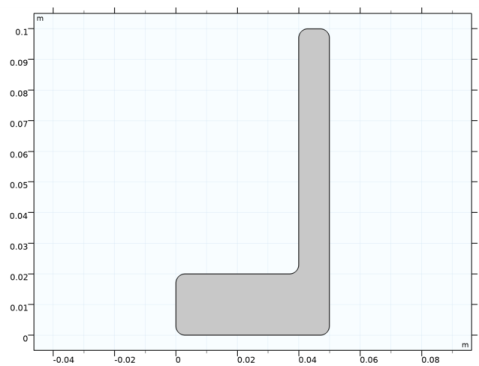
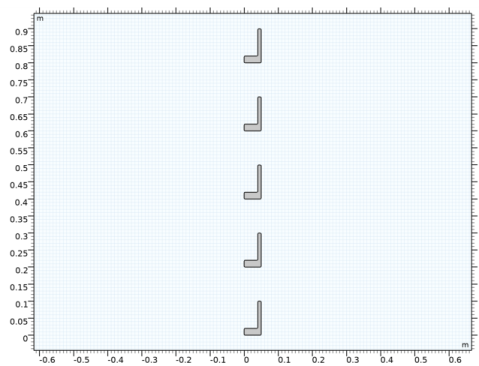
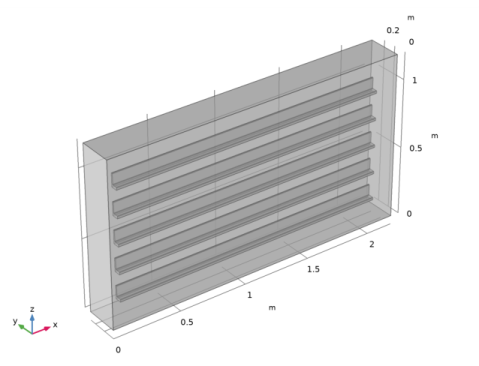
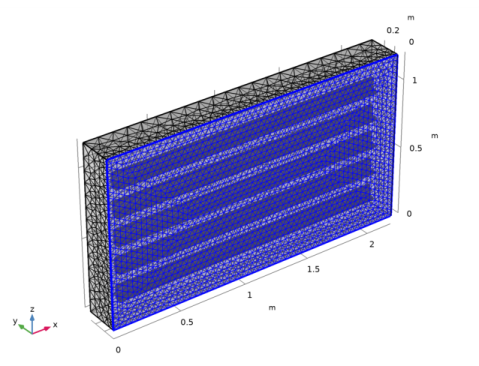
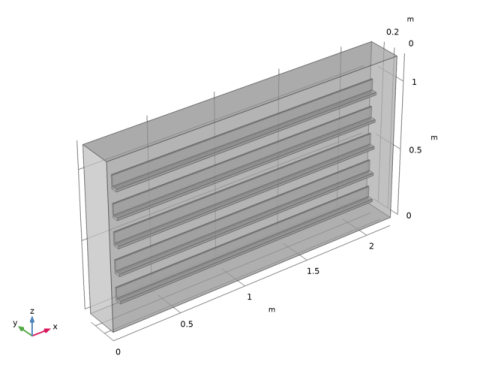
Figure 1 shows the model geometry, consisting of five L-shaped extruded aluminum anodes placed in an electrolyte bath. The cathode is represented by the rectangular boundary along the xz-plane, located at y=0.
Figure 1: Model geometry. 5 L-shaped aluminum bars in an electrolyte bath.
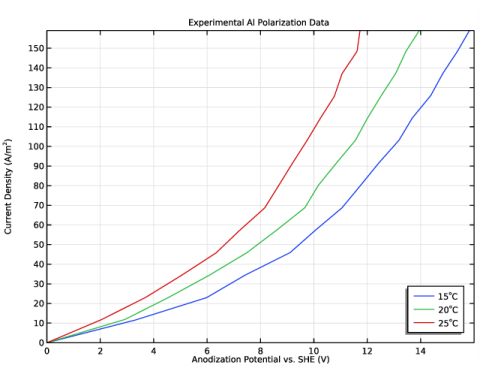
The model is created using the Secondary Current Distribution interface, using a constant electrolyte conductivity of 0.55 S/cm. The anode kinetics are defined using experimental polarization data, depending both on the electrode potential and the temperature as shown in Figure 2. An average current density of 100 A/m2 is used for the anodes. The cathode kinetics (hydrogen evolution) is assumed to be very fast so that a primary current condition can be used. The cathode potential is set to 0 V.
The problem is solved using a Stationary study with an auxiliary sweep, solving for the temperatures 15ºC, 20ºC and 25ºC.
Figure 2: Al anodization polarization data for different temperatures (Ref. 1).
Results and Discussion
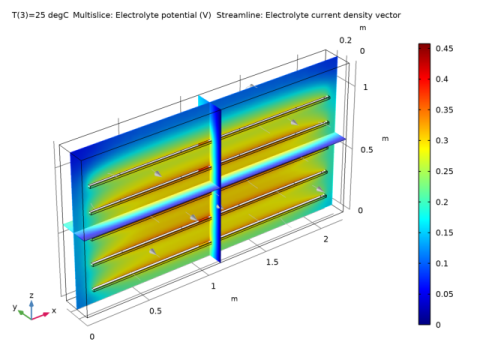
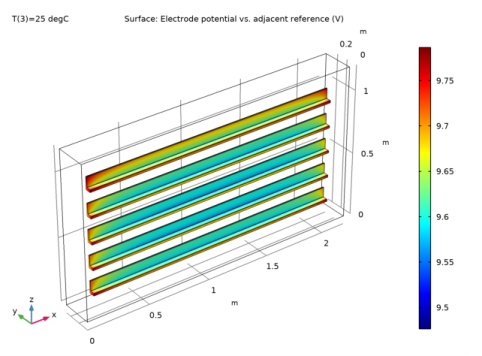
Figure 3 shows the electrolyte potential at 25ºC. The electrolyte potential drop is in the range of 450 mV. This should be compared to the electrode potential shown in Figure 4, which is in the range of 9.5 V to 9.75 V for the same temperature, resulting in a cell potential of around 10 V.
Figure 3: Electrolyte potential.
Figure 4: Electrode potential versus SHE.
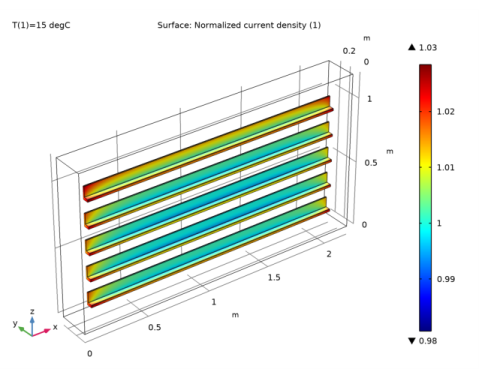
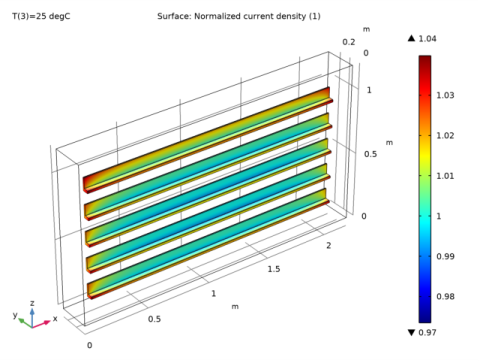
Figure 5 and Figure 6 show the normalized current distribution at 15ºC and 25ºC, respectively. At 15ºC, the current distribution becomes more uniform (the difference between the minimum and maximum values is smaller). The reason for this is the slower kinetics at the lower temperature (Figure 2), resulting in a dampening effect on local variations in current density. To achieve a more homogeneous thickness of the anodized Al layer it could therefore be beneficial to lower the process temperature. The lower temperature will however result in a higher cell potential, thus increasing the electrical energy demands of the process.
Figure 5: Normalized anode current distribution at 15ºC.
Figure 6: Normalized anode current distribution at 25ºC.
Reference
1. R Akolkar, U. Landau, H. Kuo, and Y. Wang, “Modeling of the current distribution in aluminum anodization,” Journal of Applied Electrochemistry, vol. 34, pp 807–813, 2004.
Application Library path: Electrodeposition_Module/Tutorials/al_anodization
Modeling Instructions
From the File menu, choose New.
New
In the New window, click  Model Wizard.
Model Wizard
1
In the Model Wizard window, click  3D.
2
In the Select Physics tree, select Electrochemistry>Primary and Secondary Current Distribution>Secondary Current Distribution (cd).
3
Click Add.
4
Click  Study.
5
In the Select Study tree, select General Studies>Stationary.
6
Global Definitions
Load the model parameters from a text file.
Parameters 1
1
In the Model Builder window, under Global Definitions click Parameters 1.
2
In the Settings window for Parameters, locate the Parameters section.
3
Click  Load from File.
4
Geometry 1
Now create the model geometry. First draw the aluminum profiles in a work plane, and then extrude the workplane.
Work Plane 1 (wp1)
1
In the Geometry toolbar, click  Work Plane.
2
In the Settings window for Work Plane, locate the Plane Definition section.
3
From the Plane list, choose yz-plane.
Work Plane 1 (wp1)>Plane Geometry
In the Model Builder window, click Plane Geometry.
Work Plane 1 (wp1)>Rectangle 1 (r1)
1
In the Work Plane toolbar, click  Rectangle.
2
In the Settings window for Rectangle, locate the Size and Shape section.
3
In the Width text field, type 5[cm].
4
In the Height text field, type 1[dm].
Work Plane 1 (wp1)>Rectangle 2 (r2)
1
In the Work Plane toolbar, click  Rectangle.
2
In the Settings window for Rectangle, locate the Size and Shape section.
3
In the Width text field, type 4[cm].
4
In the Height text field, type 8[cm].
5
Locate the Position section. In the yw text field, type 2[cm].
6
Click  Build Selected.
7
Click the  Zoom Extents button in the Graphics toolbar.
Work Plane 1 (wp1)>Difference 1 (dif1)
1
In the Work Plane toolbar, click  Booleans and Partitions and choose Difference.
2
3
In the Settings window for Difference, locate the Difference section.
4
Find the Objects to subtract subsection. Select the  Activate Selection toggle button.
5
6
Click  Build Selected.
Work Plane 1 (wp1)>Fillet 1 (fil1)
1
In the Work Plane toolbar, click  Fillet.
2
Click the  Select All button in the Graphics toolbar.
3
In the Settings window for Fillet, locate the Radius section.
4
In the Radius text field, type 3[mm].
5
Click  Build Selected.
Work Plane 1 (wp1)>Array 1 (arr1)
1
In the Work Plane toolbar, click  Transforms and choose Array.
2
3
In the Settings window for Array, locate the Size section.
4
In the yw size text field, type 5.
5
Locate the Displacement section. In the yw text field, type 2[dm].
6
Click  Build Selected.
7
Click the  Zoom Extents button in the Graphics toolbar.
Extrude 1 (ext1)
1
In the Model Builder window, right-click Geometry 1 and choose Extrude.
2
In the Settings window for Extrude, locate the Distances section.
3
4
Locate the Selections of Resulting Entities section. Find the Cumulative selection subsection. Click New.
5
In the New Cumulative Selection dialog box, type Anodes in the Name text field.
6
7
In the Settings window for Extrude, click  Build Selected.
8
Click the  Zoom Extents button in the Graphics toolbar.
Move 1 (mov1)
1
In the Geometry toolbar, click  Transforms and choose Move.
2
Click the  Select All button in the Graphics toolbar.
3
In the Settings window for Move, locate the Displacement section.
4
In the x text field, type 1.25[dm].
5
In the y text field, type 1[dm].
6
In the z text field, type 1[dm].
7
Click  Build Selected.
Block 1 (blk1)
1
In the Geometry toolbar, click  Block.
2
In the Settings window for Block, locate the Size and Shape section.
3
In the Width text field, type 2.2[m].
4
In the Depth text field, type 0.25[m].
5
In the Height text field, type 1.2[m].
6
Click  Build Selected.
7
Click the  Transparency button in the Graphics toolbar.
8
Click the  Zoom Extents button in the Graphics toolbar.
Difference 1 (dif1)
1
In the Geometry toolbar, click  Booleans and Partitions and choose Difference.
2
3
In the Settings window for Difference, locate the Difference section.
4
Find the Objects to subtract subsection. Select the  Activate Selection toggle button.
5
6
Click  Build Selected.
Secondary Current Distribution (cd)
Now start setting up the physics. Start with the conductivity of the Electrolyte node, which has already been added by default.
Electrolyte 1
1
In the Model Builder window, under Component 1 (comp1)>Secondary Current Distribution (cd) click Electrolyte 1.
2
In the Settings window for Electrolyte, locate the Electrolyte section.
3
From the σl list, choose User defined. In the associated text field, type sigma.
Definitions
The kinetics of the anodes make use of experimental polarization curves. Use an interpolation function to import the experimental data.
Interpolation 1 (int1)
1
In the Home toolbar, click  Functions and choose Global>Interpolation.
2
In the Settings window for Interpolation, locate the Definition section.
3
From the Data source list, choose File.
4
Click Browse.
5
6
Click Import.
7
Find the Functions subsection. In the table, enter the following settings:
8
Locate the Units section. In the Arguments text field, type V,degC.
9
In the Function text field, type A/m^2.
Integration 1 (intop1)
Also add a nonlocal integration coupling for the anode boundaries. It will be used later when normalizing the current density distribution.
1
In the Definitions toolbar, click  Nonlocal Couplings and choose Integration.
2
In the Settings window for Integration, locate the Source Selection section.
3
From the Geometric entity level list, choose Boundary.
4
From the Selection list, choose Anodes.
Secondary Current Distribution (cd)
Electrode Surface 1
1
In the Physics toolbar, click  Boundaries and choose Electrode Surface.
2
In the Settings window for Electrode Surface, locate the Boundary Selection section.
3
From the Selection list, choose Anodes.
4
Locate the Electrode Phase Potential Condition section. From the Electrode phase potential condition list, choose Average current density.
5
In the il,average text field, type i_avg.
6
In the φs,ext,init text field, type E_cell_init.
Electrode Reaction 1
1
In the Model Builder window, expand the Electrode Surface 1 node, then click Electrode Reaction 1.
2
In the Settings window for Electrode Reaction, locate the Electrode Kinetics section.
3
From the iloc,expr list, choose User defined. In the associated text field, type iloc_Al(cd.Evsref,T).
Electrode Surface 2
Now set up the cathode surface. The cathode reaction, hydrogen evolution, is very fast. Assume a negligible activation potential (a primary current distribution) for this electrode surface.
1
In the Physics toolbar, click  Boundaries and choose Electrode Surface.
2
Electrode Reaction 1
1
In the Model Builder window, expand the Electrode Surface 2 node, then click Electrode Reaction 1.
2
In the Settings window for Electrode Reaction, locate the Electrode Kinetics section.
3
From the Kinetics expression type list, choose Primary condition (thermodynamic equilibrium).
Mesh 1
Now set up the mesh.
Size
1
In the Model Builder window, under Component 1 (comp1) right-click Mesh 1 and choose Edit Physics-Induced Sequence.
2
In the Settings window for Size, locate the Element Size section.
3
From the Predefined list, choose Finer.
Size 1
1
In the Model Builder window, right-click Free Tetrahedral 1 and choose Size.
2
In the Settings window for Size, locate the Geometric Entity Selection section.
3
From the Geometric entity level list, choose Boundary.
4
5
Locate the Element Size section. From the Predefined list, choose Extremely fine.
6
Click  Build All.
Study 1
Step 1: Stationary
The model is now ready for solving. Use an auxiliary sweep to solve the problem for three different temperatures.
1
In the Model Builder window, under Study 1 click Step 1: Stationary.
2
In the Settings window for Stationary, click to expand the Study Extensions section.
3
Select the Auxiliary sweep check box.
4
5
6
In the Home toolbar, click  Compute.
Results
Electrolyte Potential (cd)
A number of default plots have been created automatically. Switch off the transparency mode to view the hidden selections.
1
Click the  Transparency button in the Graphics toolbar.
Electrode Potential vs. Adjacent Reference (cd)
Modify the Electrode Potential versus Adjacent Reference plot to plot the potential on the anodes only.
1
In the Model Builder window, click Electrode Potential vs. Adjacent Reference (cd).
2
In the Settings window for 3D Plot Group, click to expand the Selection section.
3
From the Geometric entity level list, choose Boundary.
4
From the Selection list, choose Anodes.
Streamline 1
1
In the Model Builder window, expand the Electrode Potential vs. Adjacent Reference (cd) node.
2
Right-click Streamline 1 and choose Delete.
Normalized Current Distribution
Proceed as follows to create a plot of the normalized current distribution.
1
In the Home toolbar, click  Add Plot Group and choose 3D Plot Group.
2
In the Settings window for 3D Plot Group, type Normalized Current Distribution in the Label text field.
3
Locate the Selection section. From the Geometric entity level list, choose Boundary.
4
From the Selection list, choose Anodes.
5
Locate the Color Legend section. Select the Show maximum and minimum values check box.
Surface 1
1
Right-click Normalized Current Distribution and choose Surface.
2
In the Settings window for Surface, locate the Expression section.
3
In the Expression text field, type cd.itot/i_avg.
4
Select the Description check box.
5
In the associated text field, type Normalized current density.
6
In the Normalized Current Distribution toolbar, click  Plot.
Normalized Current Distribution
You can now use the same plot group to plot for the different temperature parameter values.
1
In the Model Builder window, click Normalized Current Distribution.
2
In the Settings window for 3D Plot Group, locate the Data section.
3
From the Parameter value (T (degC)) list, choose 20.
4
In the Normalized Current Distribution toolbar, click  Plot.
5
From the Parameter value (T (degC)) list, choose 15.
6
In the Normalized Current Distribution toolbar, click  Plot.
7
From the Parameter value (T (degC)) list, choose 25.
8
In the Normalized Current Distribution toolbar, click  Plot.
Deposited Layer Thickness after 25 min
Finally, since the current density is proportional to the thickness of the deposited oxide layer, you can create a plot of the oxide layer thickness after 25 minutes of deposition time as follows:
1
Right-click Normalized Current Distribution and choose Duplicate.
2
In the Settings window for 3D Plot Group, type Deposited Layer Thickness after 25 min in the Label text field.
Surface 1
1
In the Model Builder window, expand the Deposited Layer Thickness after 25 min node, then click Surface 1.
2
In the Settings window for Surface, locate the Expression section.
3
In the Expression text field, type cd.itot*25[min]*M*eff/(6*F_const*rho*(1-por)).
This expression is based on Faraday’s law of electrolysis, where the number 6 corresponds to the number of electrons passed per deposited molecule of aluminum oxide.
4
From the Unit list, choose µm.
5
In the Description text field, type Oxide layer thickness after 25 min.
6
In the Deposited Layer Thickness after 25 min toolbar, click  Plot.