
|
|
|
|
N1
|
N2
|
N12
|
M1
|
M2
|
M12
|
||
|
N1
|
N2
|
N12
|
M1
|
M2
|
M12
|
|
|
My=-5e-3
|
Mx=5e-3
|
|||||
|
Fy=5e-3
|
Fx=5e-3
|
My=-5e-3
|
Mx=-5e-3
|
|||
|
Fx=5e-3
|
Fy=5e-3
|
My=5e-3
|
Mx=5e-3
|
Fz=2
|
||
|
Fx=5e-3
|
Fy=5e-3
|
My=5e-3
|
Mx=-5e-3
|
Fz=-2
|



|
N1
|
N2
|
N12
|
M1
|
M2
|
M12
|
|
|
ε1
|
||||||
|
ε2
|
||||||
|
γ12
|
||||||
|
κ1
|
||||||
|
κ2
|
||||||
|
κ12
|
|
N1
|
N2
|
N12
|
M1
|
M2
|
M12
|
|
|
ε1
|
||||||
|
ε2
|
||||||
|
γ12
|
||||||
|
κ1
|
||||||
|
κ2
|
||||||
|
κ12
|
|
ε1
|
||
|
ε2
|
||
|
γ12
|
||
|
κ1
|
||
|
κ2
|
||
|
κ12
|
|
ε1
|
||
|
ε2
|
||
|
γ12
|
||
|
κ1
|
||
|
κ2
|
||
|
κ12
|
|
N1
|
N2
|
N12
|
M1
|
M2
|
M12
|
|
|
ε1
|
||||||
|
ε2
|
||||||
|
γ12
|
||||||
|
κ1
|
||||||
|
κ2
|
||||||
|
κ12
|
|
N1
|
N2
|
N12
|
M1
|
M2
|
M12
|
|
|
ε1
|
||||||
|
ε2
|
||||||
|
γ12
|
||||||
|
κ1
|
||||||
|
κ2
|
||||||
|
κ12
|
|
ε1
|
|
|
ε2
|
|
|
γ12
|
|
|
κ1
|
|
|
κ2
|
|
|
κ12
|
|
ε1
|
|
|
ε2
|
|
|
γ12
|
|
|
κ1
|
|
|
κ2
|
|
|
κ12
|
|
•
|
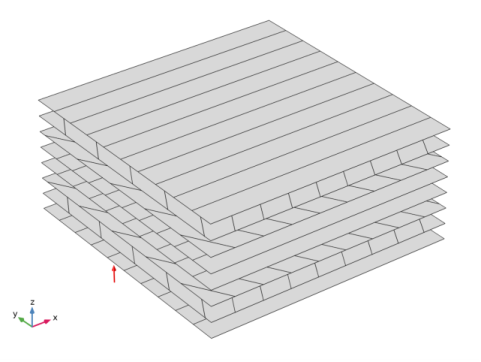
Modeling a composite laminated shell requires a surface geometry (2D), in general called a base surface, and a Layered Material node which adds an extra dimension (1D) to the base surface geometry in the surface normal direction. In the Layered Material node, you can model many layers stacked on top of each other having different thickness, material properties, and fiber orientations. You can also optionally specify the interface materials between the layers and control mesh elements in each layer.
|
|
•
|
The Layered Material Link and Layered Material Stack have an option to transform given Layered Material into a symmetric or antisymmetric laminate. A repeated laminate can also be constructed using a transform option.
|
|
•
|
From a constitutive equations point of view, you can either use the Layerwise (LW) theory based Layered Shell interface, or Equivalent Single Layer (ESL) theory based Layered Linear Elastic Material node in the Shell interface.
|
|
•
|
The six different unit load cases and two thermal loading cases requires different boundary conditions and point loads as shown in Table 2 and Table 3. To solve all these cases in a single study, different load groups and constraint groups are created, and constrains and loads corresponding to a particular case are assigned to these groups according to Table 2 and Table 3. In the Stationary node in the study, appropriate load and constraint groups are selected for each load case.
|
|
1
|
|
2
|
|
3
|
Click Add.
|
|
4
|
Click
 Study. Study. |
|
5
|
|
6
|
Click
 Done. Done. |
|
1
|
|
2
|
|
3
|
|
4
|
Browse to the model’s Application Libraries folder and double-click the file laminated_shell_material_characteristics_parameters.txt.
|
|
1
|
In the Model Builder window, right-click Global Definitions and choose Load and Constraint Groups>Load Group.
|
|
2
|
|
4
|
Select all load groups and right click on Group to create a group.
|
|
1
|
|
2
|
|
1
|
|
2
|
In the Settings window for Load Group, type Load Group for Unit Temperature Difference in the Label text field.
|
|
1
|
|
2
|
In the Settings window for Load Group, type Load Group for Unit Temperature Gradient in the Label text field.
|
|
3
|
Select thermal load groups and right click on Group to create a group.
|
|
1
|
|
2
|
|
1
|
|
2
|
In the Settings window for Constraint Group, type Constraint Group for Unit N1, N2, N12, M1 and M2 in the Label text field.
|
|
4
|
Select all constraint groups and right click on Group to create a group.
|
|
1
|
|
2
|
|
1
|
|
2
|
In the Settings window for Constraint Group, type Constraint Group for Thermal Loading in the Label text field.
|
|
1
|
|
2
|
|
4
|
Click Add three times.
|
|
6
|
|
1
|
|
2
|
|
3
|
|
4
|
|
5
|
|
1
|
In the Model Builder window, under Component 1 (comp1) right-click Materials and choose Layers>Layered Material Link.
|
|
2
|
|
3
|
|
4
|
Click to expand the Preview Plot Settings section. In the Thickness-to-width ratio text field, type 0.5.
|
|
5
|
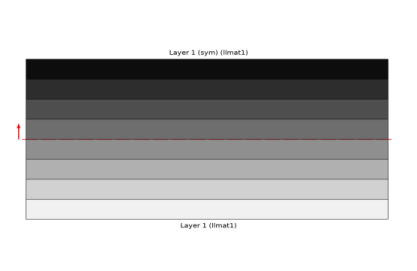
Locate the Layered Material Settings section. Click Layer Cross Section Preview in the upper-right corner of the section.
|
|
6
|
|
1
|
In the Model Builder window, expand the Component 1 (comp1)>Definitions node, then click Boundary System 1 (sys1).
|
|
2
|
|
3
|
|
1
|
|
2
|
In the Show More Options dialog box, in the tree, select the check box for the node Physics>Advanced Physics Options.
|
|
3
|
Click OK.
|
|
4
|
|
5
|
|
6
|
|
1
|
|
3
|
In the Settings window for Layered Linear Elastic Material, locate the Linear Elastic Material section.
|
|
4
|
|
1
|
|
2
|
In the Settings window for Thermal Expansion, type Thermal Expansion for Unit Temperature Difference in the Label text field.
|
|
3
|
Locate the Model Input section. From the T list, choose User defined. In the associated text field, type 293.15[K] +1[K].
|
|
4
|
|
1
|
|
2
|
In the Settings window for Thermal Expansion, type Thermal Expansion for Unit Temperature Gradient in the Label text field.
|
|
3
|
Locate the Thermal Bending section. From the list, choose Temperature gradient in thickness direction.
|
|
4
|
|
5
|
|
1
|
|
2
|
|
1
|
|
2
|
In the Settings window for Fixed Constraint, type Fixed Constraint for Unit N1, N2, N12, M1 and M2 in the Label text field.
|
|
4
|
In the Physics toolbar, click
 Constraint Group and choose Constraint Group for Unit N1, N2, N12, M1 and M2. Constraint Group and choose Constraint Group for Unit N1, N2, N12, M1 and M2. |
|
1
|
|
2
|
In the Settings window for Prescribed Displacement/Rotation, type Prescribed Displacement/Rotation for Unit N1 and M1 in the Label text field.
|
|
4
|
|
5
|
|
6
|
Duplicate the Prescribed Displacement/Rotation 1 node nine times to get required numbers of nodal constraints. Label, selection, constraints, constraint groups should be as shown in table below.
|
|
1
|
|
2
|
|
4
|
|
5
|
|
6
|
Duplicate the Point Load 1 node nine times to get required numbers of nodal loads. Label, selection, loads, load groups should be as shown in the table below.
|
|
1
|
|
2
|
|
3
|
|
1
|
|
2
|
|
3
|
|
4
|
|
5
|
|
1
|
|
2
|
|
3
|
|
1
|
|
2
|
|
3
|
|
4
|
Click
 Add seven times. Add seven times. |
|
6
|
|
1
|
|
2
|
|
3
|
|
4
|
|
5
|
|
1
|
In the Extensional Flexibility Matrix toolbar, click
 More Evaluations and choose Point Matrix Evaluation. More Evaluations and choose Point Matrix Evaluation. |
|
3
|
In the Settings window for Point Matrix Evaluation, click Replace Expression in the upper-right corner of the Expression section. From the menu, choose Component 1 (comp1)>Shell>Stiffness and flexibility>Extensional flexibility matrix>shell.Da - Extensional flexibility matrix - s²/kg.
|
|
1
|
|
2
|
|
1
|
Go to the Table window.
|
|
2
|
To compute the remaining flexibility and stiffness matrices, duplicate the above node seven times and change the expression to compute shell.Db, shell.Dd, shell.Das, shell.DA, shell.DB, shell.DD and shell.DAs.
|
|
1
|
|
2
|
|
3
|
|
4
|
|
5
|
|
6
|
|
1
|
|
2
|
In the Settings window for Evaluation Group, type Midplane Strains for Unit N1 in the Label text field.
|
|
3
|
|
4
|
|
5
|
|
6
|
|
1
|
|
2
|
|
1
|
|
2
|
|
1
|
Go to the Table window.
|
|
2
|
To compute the midplane strains for remaining load cases, duplicate the above node seven times and change the load case in the Data section of corresponding Evaluation Group node. Replace the in-plane force/moment variable in the last row of table in Point Evaluation node with appropriate variable corresponding to the load cases.
|


