You are viewing the documentation for an older COMSOL version. The latest version is
available here
.
Materials
The next step is to add material settings to the model. The air that fills most of the volume is available as a built-in material. The lossy ferrite has material assigned to it later, and illustrates how external material data can also be entered directly into the electromagnetic waves model. The walls of the waveguide sections are modeled as perfect conductors and do not require a material.
1
On the Home toolbar click Add Material
.
2
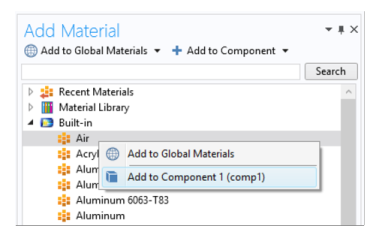
In the Materials tree under Built-In, right-click Air and choose Add to Component 1
.
3
Click Add Material
again to close the Add Material window.
 .
. .
.
 again to close the Add Material window.