You are viewing the documentation for an older COMSOL version. The latest version is available here.
PDF

Isospectral Drums
Introduction
This example examines an interesting question posed by Mark Kac in 1966 (Ref. 1): “Can one hear the shape of a drum?”
Striking a drum excites a spectrum of vibration modes that together make up the instrument’s characteristic sound or acoustic signal. These vibration modes correspond to the eigenmodes, or eigenfunctions, of the drum’s membrane. Thus you can study this problem by solving eigenvalue problems for stretched membranes.
If you can find two differently shaped membranes that have identical eigenvalues — in other words, they are isospectral — then it is not possible to hear the shape of a specific drum.
In 1992, Gordon, Webb, and Wolpert (Ref. 2) showed that there are indeed sets of different planar shapes (nonisometric shapes) that are isospectral.
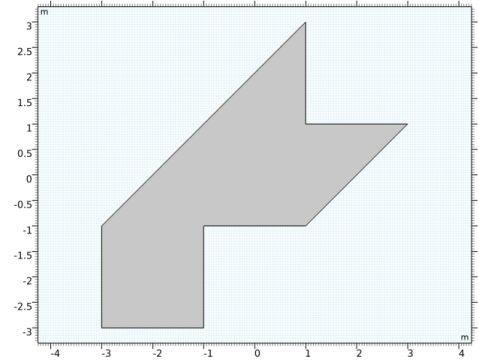
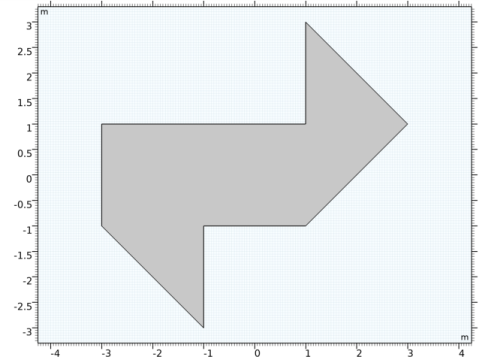
Work by Driscoll (Ref. 3) contains the following example of two planar shapes that sound the same.
Model Definition
The model shows the eigensolutions (the eigenvalues and eigenmodes) in two isospectral domains. Both cases use the solution to the same eigenvalue PDE:
The membranes are fixed at the boundaries; that is, a homogeneous Dirichlet boundary condition applies for all boundaries.
Results and Discussion
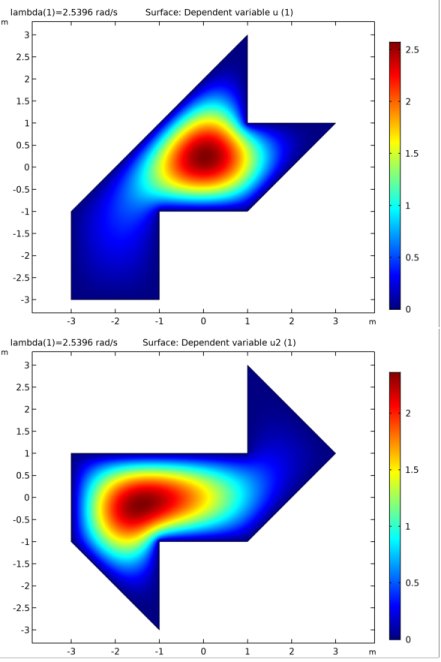
The sets of eigenvalues show that the domains are isospectral. Figure 1 shows two eigenmodes, one for each membrane shape, with the same eigenvalue. Note that eigenfunction normalization and sign are arbitrary and can vary from case to case.
Figure 1: Eigenfunctions for the two different membranes with the same eigenvalue.
For each membrane shape, a straightforward postprocessing step shows that the eigenmodes found are orthogonal.
Notes About the COMSOL Implementation
In a single MPH-file, build two COMSOL Multiphysics models that solve the eigenvalue PDE on two different 2D domains, and compare the sets of eigenvalues.
The model shows how to use the with operator to access different eigenmodes during postprocessing.
References
1. M. Kac, “Can One Hear the Shape of a Drum?,” American Math. Mon., vol. 73 Part II, pp. 1–23, 1966.
2. C. Gordon, D. Webb, and S. Wolpert, “Isospectral Plane Domains and Surfaces via Riemannian Orbifolds,” Invent. Math., vol. 110, pp. 1–22, 1992.
3. T. Driscoll, “Eigenmodes of Isospectral Drums,” Technical Report-Center for Theory and Simulation in Science and Engineering, Cornell University, Ithaca, N.Y., CTC95TR209, May 1995.
Application Library path: COMSOL_Multiphysics/Equation_Based/isospectral_drums
Modeling Instructions
From the File menu, choose New.
New
In the New window, click Model Wizard.
Model Wizard
1
In the Model Wizard window, click 2D.
2
In the Select Physics tree, select Mathematics>PDE Interfaces>Coefficient Form PDE (c).
3
Click Add.
4
Click Study.
5
In the Select Study tree, select General Studies>Eigenvalue.
6
Click Done.
Geometry 1
Polygon 1 (pol1)
1
In the Geometry toolbar, click Primitives and choose Polygon.
2
In the Settings window for Polygon, locate the Coordinates section.
3
4
Click Build All Objects.
5
Click the Zoom Extents button in the Graphics toolbar.
Coefficient Form PDE (c)
Use the default values of the coefficients of PDE to model this problem.
Dirichlet Boundary Condition 1
1
In the Physics toolbar, click Boundaries and choose Dirichlet Boundary Condition.
2
In the Settings window for Dirichlet Boundary Condition, locate the Boundary Selection section.
3
From the Selection list, choose All boundaries.
Applying Dirichlet boundary conditions corresponds to clamping the drum’s membrane at the edges.
Mesh 1
1
In the Model Builder window, under Component 1 (comp1) click Mesh 1.
2
In the Settings window for Mesh, locate the Physics-Controlled Mesh section.
3
From the Element size list, choose Extra fine.
By using a finer mesh, you reduce the apparent discrepancies between the matching eigenvalues caused by numerical errors.
4
Click Build All.
Study 1
1
In the Home toolbar, click Compute.
The default settings for an Eigenvalue study step gives the six lowest eigenvalues.
Results
2D Plot Group 1
1
Click the Zoom Extents button in the Graphics toolbar.
The default plot shows the eigenfunctions for the lowest eigenmode; compare with the upper plot in Figure 1.
Root
Now add a second model for the alternative membrane shape.
Click Component and choose Add Component>2D.
Geometry 2
In the Model Builder window, under Component 2 (comp2) click Geometry 2.
Add Physics
1
In the Home toolbar, click Add Physics to open the Add Physics window.
2
Go to the Add Physics window.
3
In the tree, select Mathematics>PDE Interfaces>Coefficient Form PDE (c).
4
Find the Physics interfaces in study subsection. In the table, clear the Solve check box for Study 1.
5
Click Add to Component in the window toolbar.
6
In the Home toolbar, click Add Physics to close the Add Physics window.
Add Study
1
In the Home toolbar, click Add Study to open the Add Study window.
2
Go to the Add Study window.
3
Find the Physics interfaces in study subsection. In the table, clear the Solve check box for the Coefficient Form PDE (c) interface.
4
Find the Studies subsection. In the Select Study tree, select General Studies>Eigenvalue.
5
Click Add Study in the window toolbar.
6
In the Home toolbar, click Add Study to close the Add Study window.
Geometry 2
Polygon 1 (pol1)
1
In the Geometry toolbar, click Primitives and choose Polygon.
2
In the Settings window for Polygon, locate the Coordinates section.
3
4
Click Build All Objects.
5
Click the Zoom Extents button in the Graphics toolbar.
Coefficient Form PDE 2 (c2)
Use the same domain settings and boundary conditions as for the first model.
Dirichlet Boundary Condition 1
1
In the Physics toolbar, click Boundaries and choose Dirichlet Boundary Condition.
2
In the Settings window for Dirichlet Boundary Condition, locate the Boundary Selection section.
3
From the Selection list, choose All boundaries.
Mesh 2
1
In the Model Builder window, under Component 2 (comp2) click Mesh 2.
2
In the Settings window for Mesh, locate the Physics-Controlled Mesh section.
3
From the Element size list, choose Extra fine.
4
Click Build All.
Study 2
In the Home toolbar, click Compute.
Results
2D Plot Group 2
1
Click the Zoom Extents button in the Graphics toolbar.
The new default plot should now look like the lower plot in Figure 1.
Derived Values
Use the with operator to access different eigenmodes in order to show that they are orthogonal:
1
In the Model Builder window, under Results click Derived Values.
Surface Integration 1
1
In the Results toolbar, click More Derived Values and choose Integration>Surface Integration.
2
3
In the Settings window for Surface Integration, locate the Expressions section.
4
5
Click Evaluate.
Table
1
Go to the Table window.
The value of integral, which is very small (of the order of 1016), appears in the Table window. Ideally, the result should be zero when the eigenmodes are orthogonal, but using a numerical method you can expect a small nonzero number.
Results
Finally, do the same for second model.
Surface Integration 2
1
In the Results toolbar, click More Derived Values and choose Integration>Surface Integration.
2
In the Settings window for Surface Integration, locate the Data section.
3
From the Data set list, choose Study 2/Solution 2 (3) (sol2).
4
5
Locate the Expressions section. In the table, enter the following settings:
6
Click Evaluate.